The problem
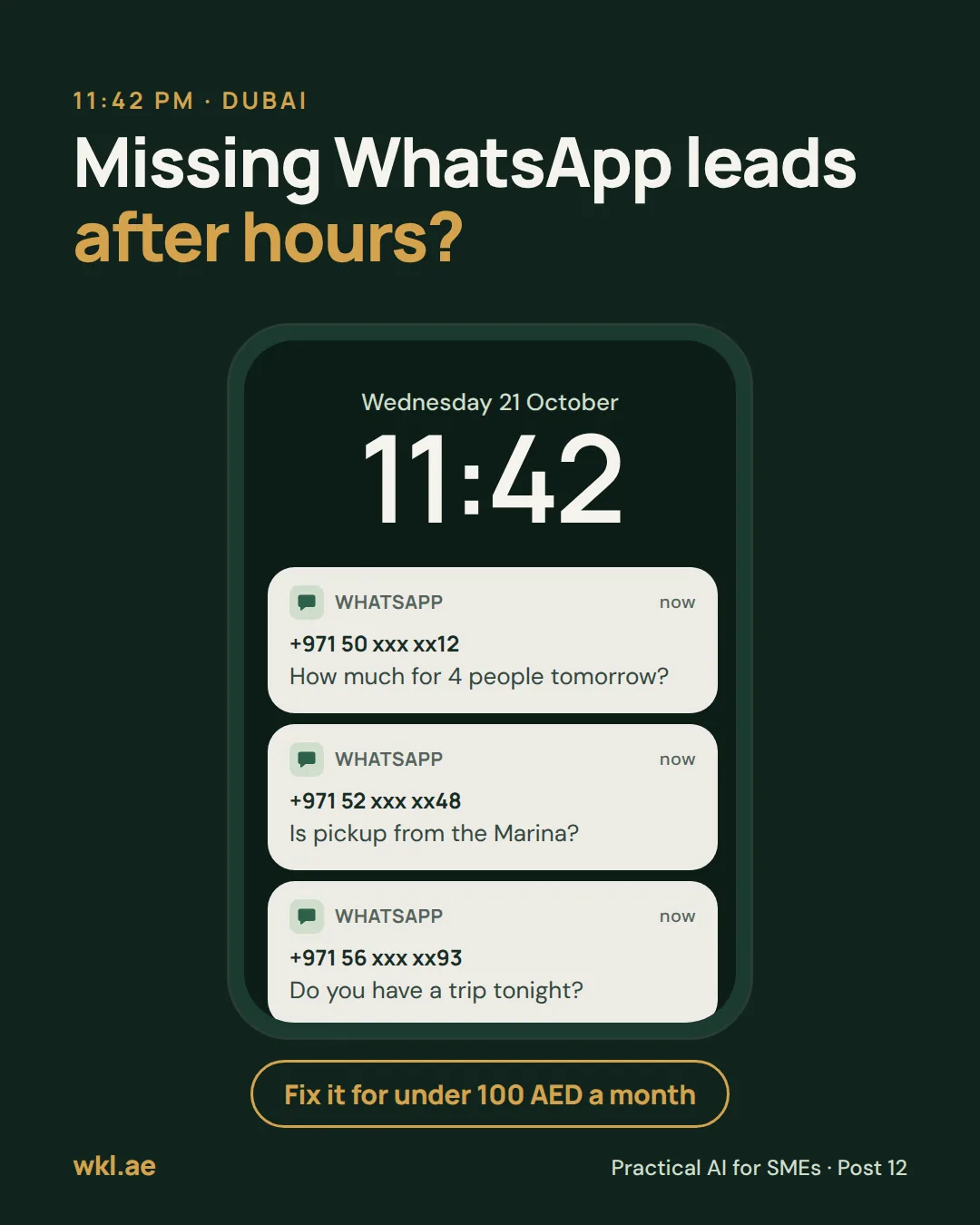
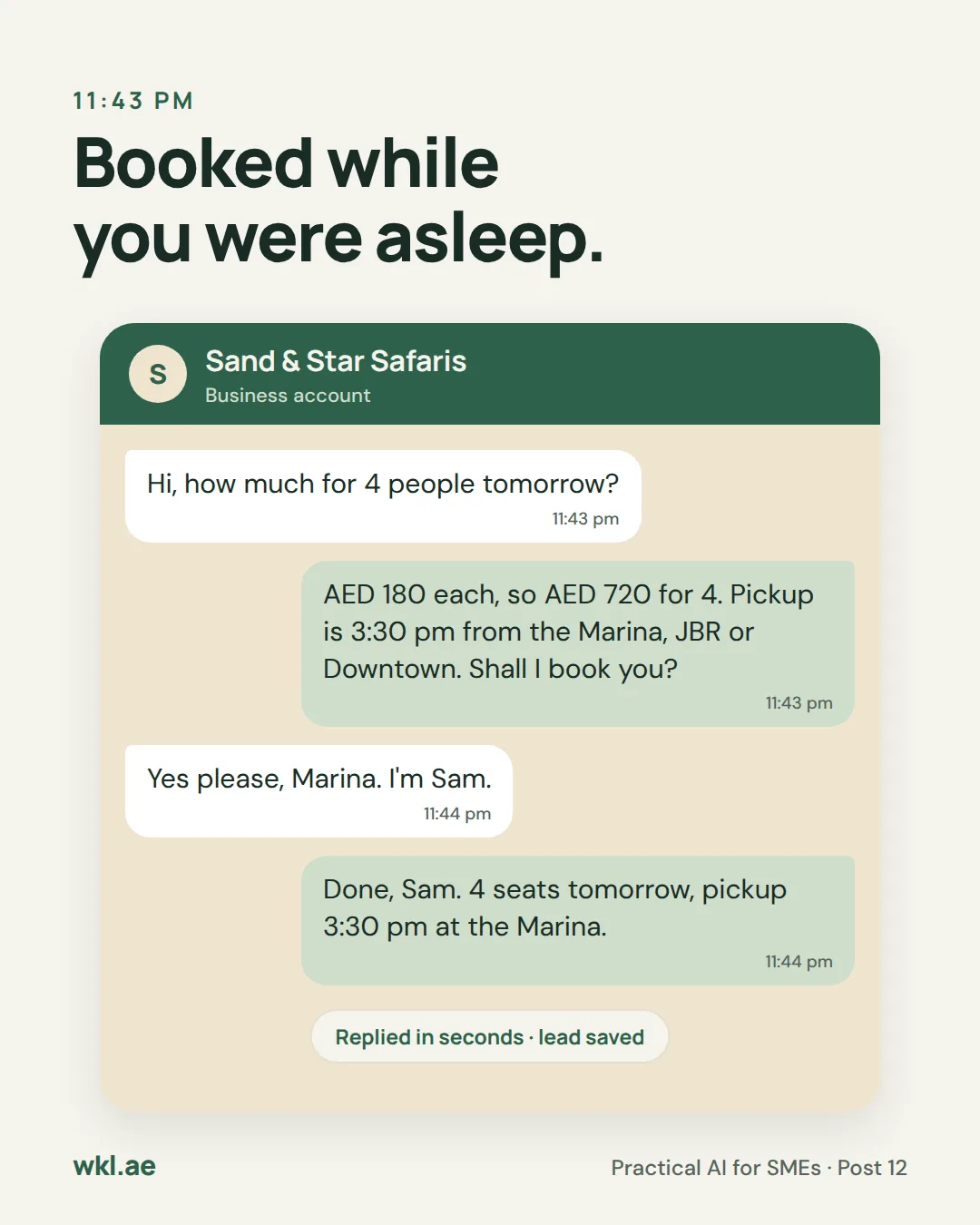
A tourist messages at 11:42 pm: how much for four people tomorrow? Nobody replies until 9 am. By then they may have booked with whoever answered first.
In the UAE, a lot of selling happens in WhatsApp chats. 85% of UAE residents want businesses to be on WhatsApp (Zbooni and YouGov, 2024). And most of what they ask is the same handful of things: the price, pickup, timings, whether there’s space and how to book. Answering those at midnight doesn’t need you. Deciding a refund does.
Post 03 set up the AI agent that comes free with the WhatsApp Business app. This guide is the step up: Claude answers on your business number using instructions you write yourself, saves every lead to a Google Sheet you own, and hands refunds and complaints to a person and stays out of that chat until you’re done.
Our example is a made-up Dubai desert safari company, Sand & Star Safaris, at AED 180 a person. Swap in your own prices and rules and it works the same way for a clinic, a salon, a tour desk or a home services company.
What you need
- Claude API, with Claude Haiku 5.5
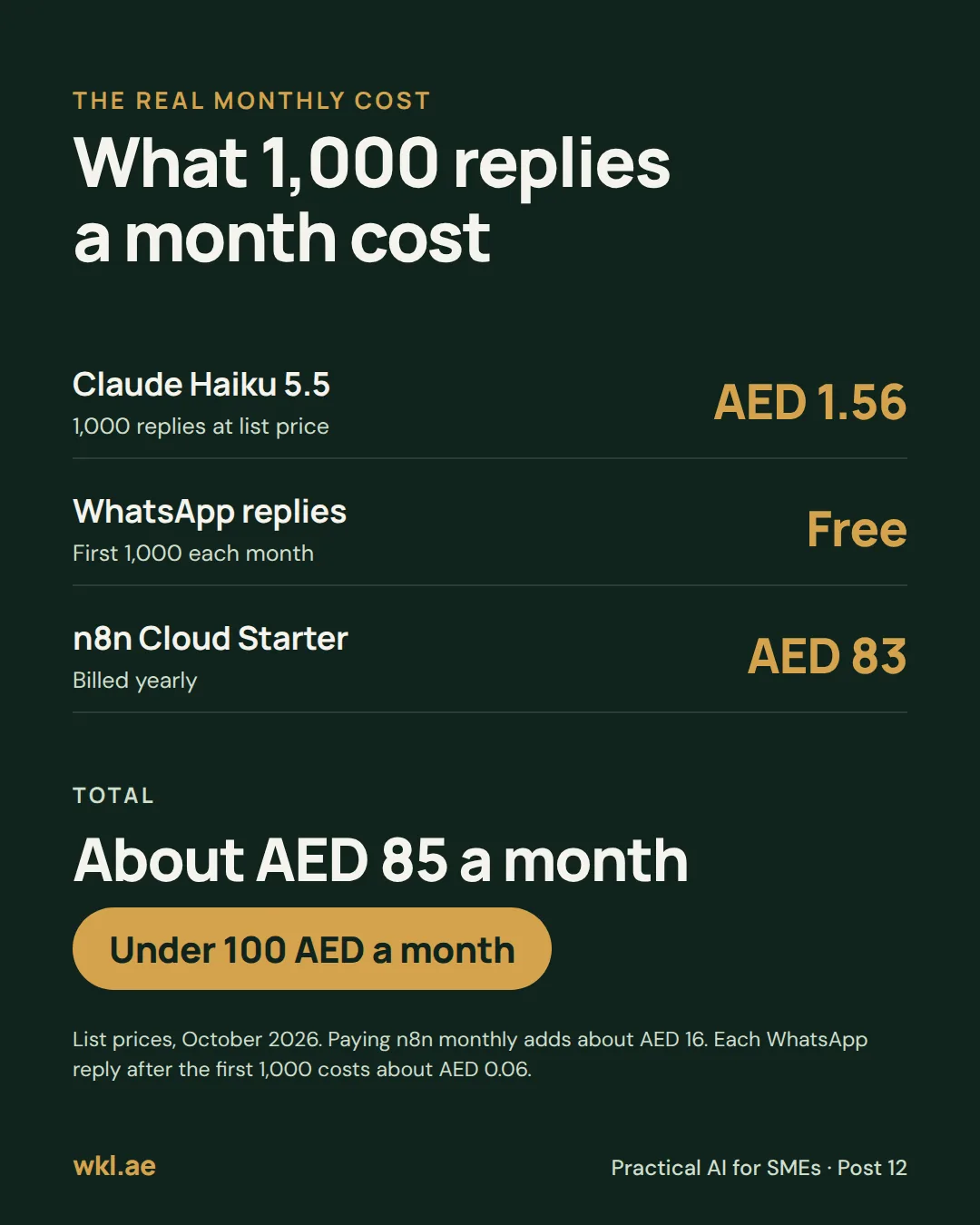
The brain. It reads each message and writes the reply. Pay as you go with prepaid credits in the Claude Console, separate from a Claude Pro subscription. At USD 0.10 per million tokens in and USD 0.50 out, 1,000 replies cost about USD 0.43.~2 AED / 1,000 replies - n8n Cloud Starter
Connects WhatsApp, Claude and Google. You build the workflow by dragging boxes, with no code. €20 a month billed yearly (about 83 AED) or about 99 AED paid monthly, with 2,500 runs a month. The free trial needs no card.~83 AED / mo - WhatsApp Business Platform
Meta’s version of WhatsApp Business for software. Free to set up. Since 1 October 2026, the first 1,000 replies per number each month are free, then about AED 0.06 a reply in the UAE.Free to start - A Meta business portfolio and a phone number
You start on Meta’s free test number. To go live you need a number for the front desk that isn’t already in use on the WhatsApp or WhatsApp Business app.You have it - A Google account
Google Sheets for the leads and Gmail to tell you about handoffs.Free - Your facts and rules
Prices, times, areas, how people pay and who handles refunds. The instructions are further down this page.Free
That’s about 85 AED a month for 1,000 replies with n8n billed yearly, or about 101 AED paid monthly.
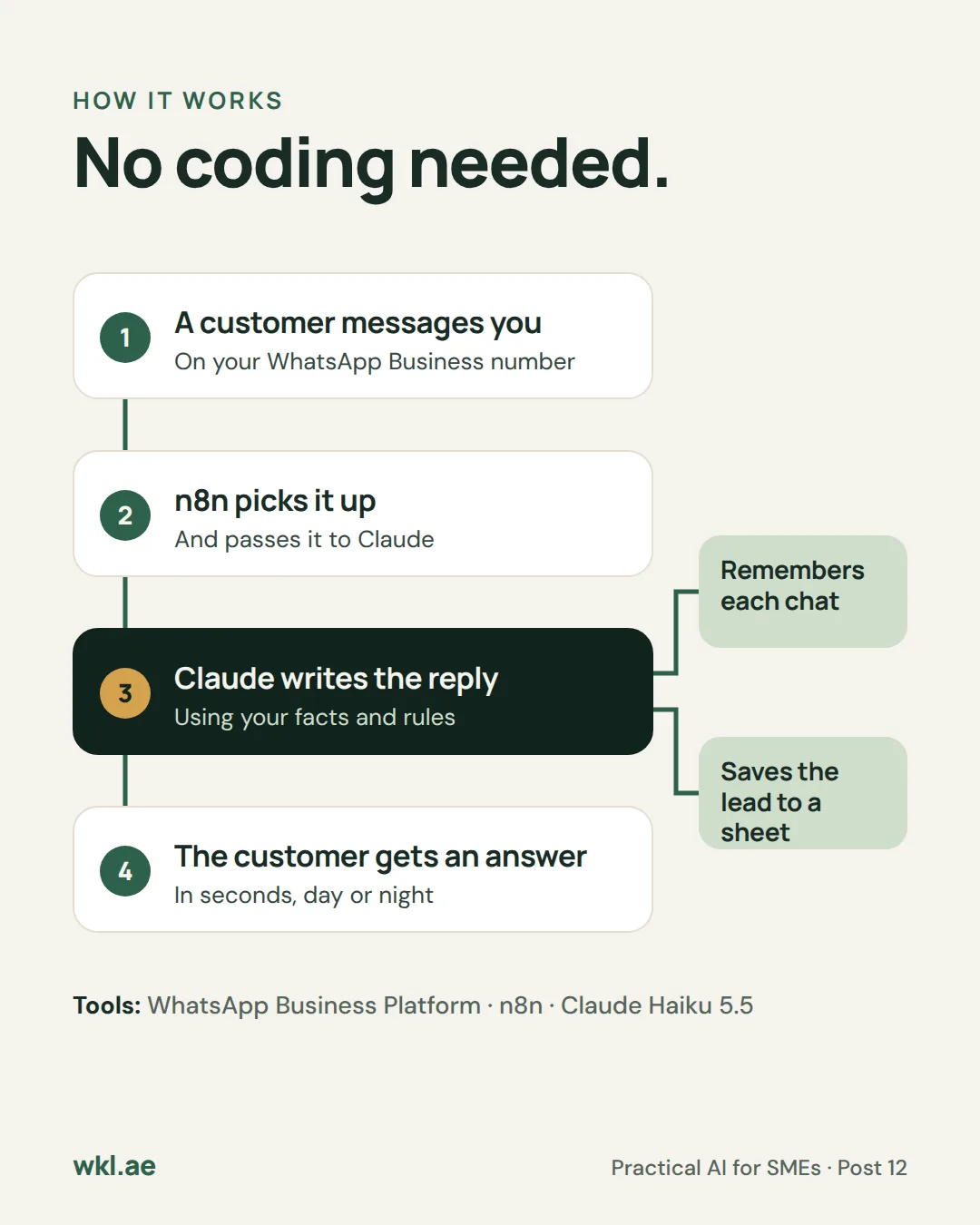
How it works
-
One-time Setup
Connect it and brief it
Create a Meta app with a test number, connect it to n8n, and paste your facts and rules into the instructions Claude reads before every reply.
-
Every message On its own
Answers from your facts
It replies in one to three short lines, in the language the customer wrote in. If the answer isn’t in your facts, it says a person will confirm rather than guess.
-
Every booking On its own
Takes the details and books
It asks for whatever is missing (name, number of people, day and pickup area), one question at a time, confirms the booking and saves it to the sheet.
-
Every lead On its own
Logs it in one sheet
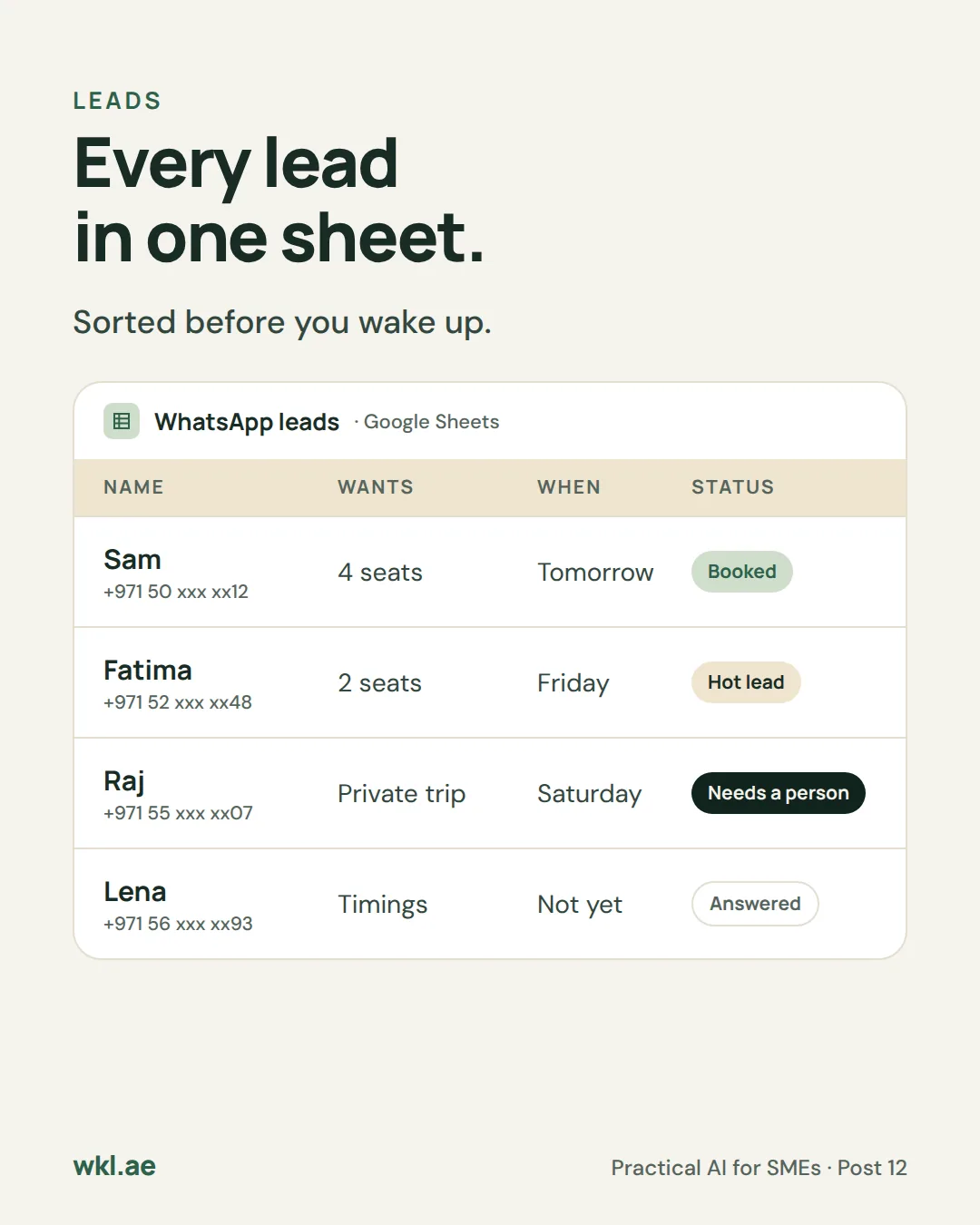
Each chat ends up as a row with a status: booked, hot lead, answered or needs a person. You read it with your morning coffee.
-
Refunds and complaints You reply
Hands off to a person
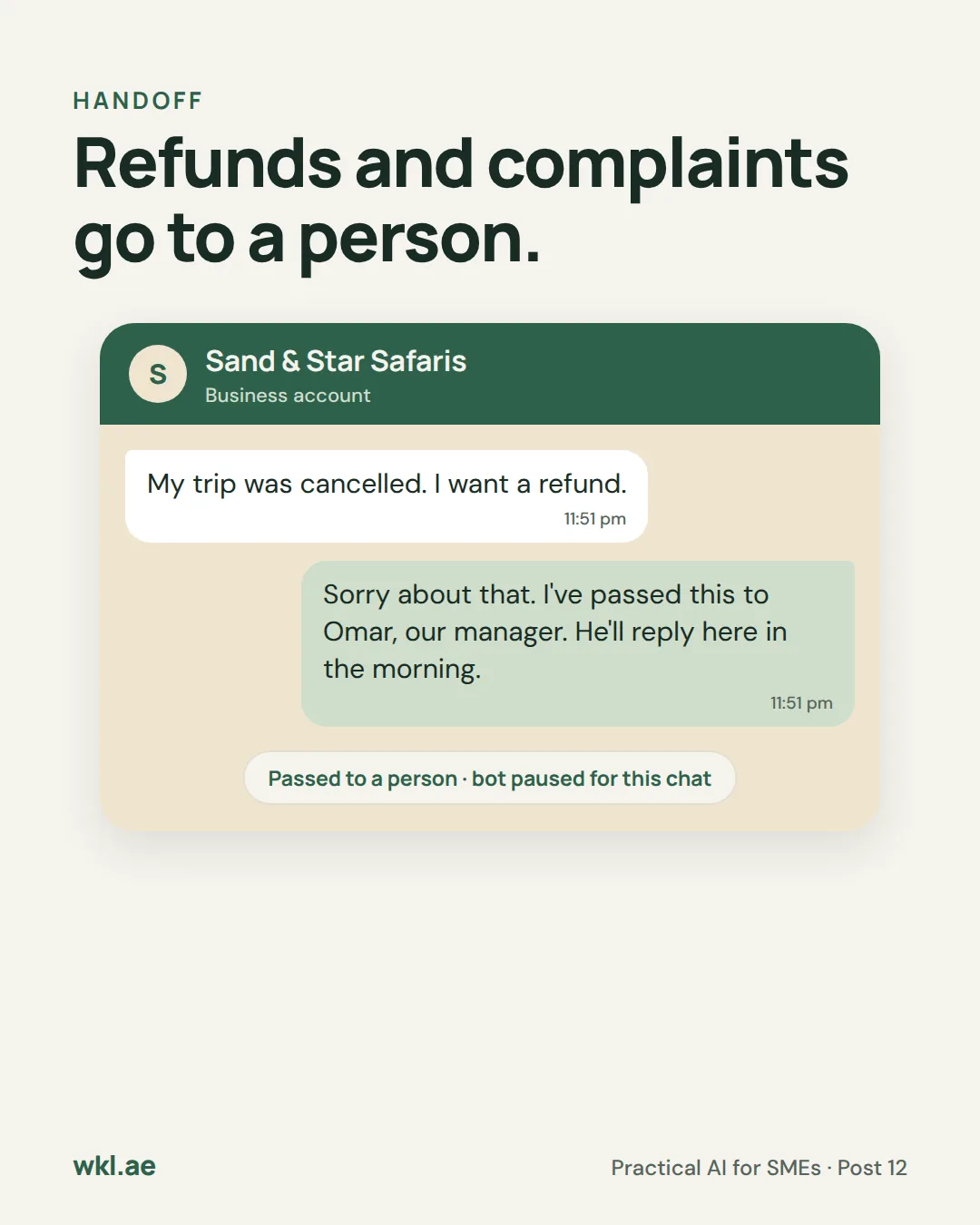
It tells the customer a named person will reply, emails you a one-line summary and stops replying in that chat until you mark it closed.
Your rule: it answers and books from your facts. It never changes a price, offers a discount, decides a refund or argues with a customer.
What the sheet looks like in the morning
Made-up rows for the sample safari company, the same ones as on the slides.
| Name | Wants | When | Status |
|---|---|---|---|
| Sam | 4 seats, pickup at the Marina | Tomorrow, 3:30 pm | Booked |
| Fatima | 2 seats, asked about children’s prices | Friday | Hot lead |
| Raj | A private trip for 12 | Saturday | Needs a person |
| Lena | Asked what time it ends | Not yet | Answered |
A private trip for 12 isn’t in the price list, so it goes to a person. That’s the instructions working, not the AI failing.
How to set it up, step by step
Allow about two hours the first time, most of it in steps 5 and 6. You’ll work on Meta’s free test number until everything works, so no customer sees a half-built bot. Open a step to see exactly what to do and how to tell it worked.
Before you start, have these ready
- A Facebook account you can use for Meta’s developer site, and admin access to your business portfolio in Meta Business Suite.
- Your own mobile number, to message the test number from.
- A Google account for the sheet and the handoff emails.
- A card for the Claude Console credits. A small top-up lasts a long time at these prices.
- A privacy policy page on your website. Meta asks for its address before your app can go live.
- Your prices, times, areas and refund rules, written down.
Create the Meta app and get a test number15 minutes · free
- Go to developers.facebook.com, open My Apps and click Create App. Pick the use case "Connect with customers through WhatsApp" and choose your business portfolio.
- Click Start using the API. On the API Setup page, Meta gives you a free test number.
- Note two numbers from that page: the Phone number ID and the WhatsApp Business Account ID. You’ll paste them into n8n later.
- Under To, add your own mobile number and confirm the code Meta sends you. Then click Send message.
Done when: Meta’s hello message arrives on your phone from the test number.
Make a token that doesn’t expire10 minutes
The token on the API Setup page is temporary. It expires quickly, and a bot built on it stops working the next day. Make a permanent one instead.
- In Meta Business Suite, open Business settings, then Users, then System users, and add a system user with admin access.
- Assign it two assets: your app, with permission to manage it, and your WhatsApp account, with permission to manage it.
- Click Generate token, choose your app and tick three permissions: business_management, whatsapp_business_messaging and whatsapp_business_management. If you’re asked when it should expire, choose never.
- Copy the token into a password manager. Meta shows it once.
Done when: the token is saved somewhere safe. Never paste it into a chat or an email.
Open n8n and add your connections15 minutes · free trial
- Sign up for n8n Cloud. The trial needs no card and includes 1,000 runs, enough to finish this guide.
- In n8n, open Credentials and add four:
- WhatsApp OAuth, for receiving messages. In your Meta app, open App settings, then Basic. Paste the App ID as the Client ID and the App Secret as the Client Secret.
- WhatsApp API, for sending replies. Paste the permanent token from step 2 as the Access Token, and the WhatsApp Business Account ID from step 1.
- Anthropic, for Claude. In the Claude Console, buy a small amount of credit, create an API key and paste it here.
- Google Sheets and Gmail. Sign in with your Google account when n8n asks.
Done when: all four show as connected, with no red warning.
Make the sheet5 minutes
Create a Google Sheet called “WhatsApp front desk” with two tabs. Type these headings in row 1 exactly as written, because the workflow fills the columns by name.
- Leads: Date, Name, Phone, Wants, People, Day, Pickup, Status
- Handoffs: Date, Name, Phone, Summary, Status
Done when: both tabs exist with their headings and nothing else.
Build the workflow30 minutes
Create a new workflow in n8n and add these boxes from left to right. Where a field needs the customer’s details, drag them in from the WhatsApp Trigger’s output on the left of each box. The names below are what the trigger usually shows.
- WhatsApp Trigger. Use your WhatsApp OAuth connection and choose the Messages update.
- If: is it a text? Check that the message type is “text”. WhatsApp also sends delivery updates, voice notes and photos to the same place, and this stops them here.
- Google Sheets: is a person handling this chat? Get rows from the Handoffs tab where Phone is the customer’s number and Status is “open”. In the box’s settings, turn on Always Output Data, so the workflow carries on when nothing is found.
- If: no open handoff? Carry on only when no row came back. If one did, the workflow stops and your colleague keeps the chat.
- AI Agent. Set the prompt to the customer’s message text, and paste the instructions below into the System Message option. Attach four things underneath it:
- Anthropic Chat Model, with Claude Haiku 5.5 as the model. If your n8n doesn’t list it yet, enter claude-haiku-5-5 as the model ID. Set the temperature low, around 0.2, and turn on prompt caching, which cuts the cost of resending the same instructions.
- Simple Memory, with the customer’s phone number as the session key and about 10 messages of context. This keeps each customer’s chat separate.
- Google Sheets tool called save_lead: append a row to the Leads tab, and let the model fill each column.
- Google Sheets tool called hand_off, which appends to the Handoffs tab with Status “open”, and a Gmail tool called alert_owner, which emails you the summary.
- WhatsApp Business Cloud: send message. Use your WhatsApp API connection, the Phone number ID from step 1, the customer’s number as the recipient and the AI Agent’s output as the text.
Done when: the workflow saves without errors and every box shows its connection.
Test it from your own phone20 minutes
- Publish the workflow, then message the test number from your phone. WhatsApp only sends messages to one address per app, and n8n’s test address and live address replace each other, so testing on the published workflow is simplest.
- Ask a price question, then book: give a name, a number of people, a day and a pickup area. Check the replies, then check the Leads tab.
- Ask for something that isn’t in your facts, such as a private trip for 12. It should say a person will confirm.
- Write “I want a refund”. You should get the handoff reply, a row in Handoffs marked open and an email. Send another message: nothing should come back.
- Open Executions in n8n and look at how many runs your test used. Compare it with how many messages you sent.
Done when: answers, bookings, the handoff and the silence afterwards all behave as described.
Set up how you reply to handoffs15 minutes
Your front desk number now lives in the WhatsApp Business Platform, so you reply through n8n rather than a phone app. A small second workflow does it.
- Create a new workflow that starts with an n8n Form Trigger, with two fields: Phone and Message.
- Add a WhatsApp Business Cloud box that sends the Message to the Phone, then a Google Sheets box that sets that row’s Status in Handoffs to “closed”.
- Publish it and save the form’s address on your phone’s home screen.
WhatsApp lets a business send ordinary replies for 24 hours after the customer’s last message. After that, call the customer, or send an approved message template instead.
Done when: a reply from the form reaches your phone, the row turns closed and the bot answers your next message again.
Go live on your real number30 minutes, plus Meta’s review
- In WhatsApp Manager, add your front desk number, verify it with the code Meta sends and set the display name customers will see. Meta reviews the name.
- Add a payment method. Meta stops delivering replies after the free 1,000 a month if there’s no payment method on file.
- In your app’s settings, add your privacy policy address and switch the app to Live.
- In n8n, swap the test number’s Phone number ID for the new one in both workflows.
- Put the number on your website, Google profile and Instagram, and add how to reach a person to your WhatsApp business profile.
Done when: a friend messages the real number and gets a correct reply.
Your 10 minutes a day
- Handoffs first. Read the emails and the open rows in Handoffs, reply through your form and close each one.
- Confirm the bookings. Skim the Leads tab, send the payment link or confirm pickup the way you normally would.
- Follow up the hot leads while they’re still warm. These are people who asked about a price or a date but didn’t book.
- Update the facts the same day a price or a time changes. It only knows what you’ve written down.
- Once a week, check the runs under Usage in n8n against your plan’s 2,500.
If something goes wrong
- Nothing comes back when you message it
- Check that the workflow is published. If you ran a test from inside the editor, n8n may have replaced the live address with its test address. Publish it again. While the app is in development mode, only the numbers you added as test recipients get replies.
- It worked yesterday and stopped today
- You’re probably still on the temporary token from the API Setup page. Replace it with the system user token from step 2.
- Your n8n runs are running out fast
- Delivery updates from WhatsApp can count as runs even though the first If box stops them. If your runs are three or four times your messages, move to a bigger n8n plan or ask someone to put a filter in front of n8n.
- A reply makes something up
- The fact it needed is missing from your instructions. Add it in plain words, and keep the rule that it says a person will confirm when it doesn’t know.
- It keeps replying in a chat you took over
- Check the row in Handoffs. The phone number must match exactly and the Status must say “open”.
- A customer sends a voice note or a photo
- The first If box drops anything that isn’t text, so the bot stays quiet. Either add a fixed reply asking them to type their question, or check those chats yourself.
- Your reply from the form doesn’t arrive
- More than 24 hours have passed since the customer last wrote. Call them, or use an approved message template.
- You want to stop it
- Unpublish the workflow in n8n. To cut its access completely, delete the system user’s token in Business settings and the API key in the Claude Console.
The instructions
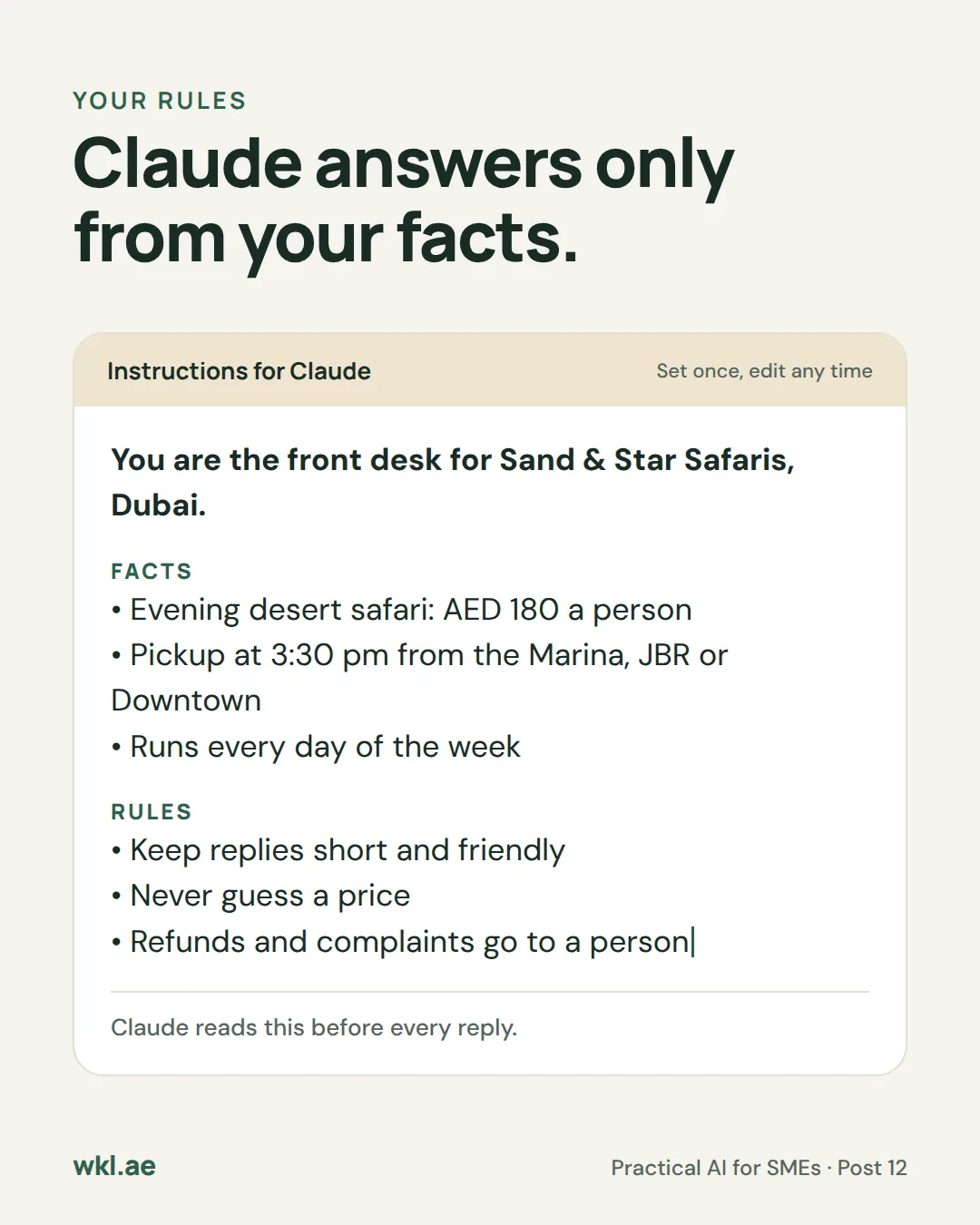
You are the WhatsApp front desk for [business name] in [area], Dubai. You reply to customers on your own, day and night, and nobody checks your replies before they're sent. Stick to the facts below.

ABOUT US
- What we offer: [for example, evening desert safari with BBQ dinner]
- Prices: [for example, AED 180 a person, children under 5 free]
- Times: [for example, every day, pickup at 3:30 pm, back by 9:30 pm]
- Pickup areas: [for example, Dubai Marina, JBR and Downtown]
- How people pay: [for example, a card link we send after booking]
- Who handles refunds and complaints: [first name]

HOW YOU REPLY
- Reply in the language the customer writes in. Keep it to 1 to 3 short, friendly lines.
- Answer only from ABOUT US. If the answer isn't there, say a person will confirm, and use hand_off.
- Never guess or change a price, offer a discount, or promise anything that isn't listed above.

BOOKINGS
- To book you need four things: name, number of people, day and pickup area. Ask for whatever is missing, one question at a time.
- When you have all four, confirm them back in one line, then use save_lead with Status "Booked".
- If they asked about a price or a date but didn't book, use save_lead with Status "Hot lead". If they only asked a general question, use Status "Answered".
- Fill Date with today's date, and Phone with the customer's WhatsApp number.

HANDOFF
If the customer asks for a refund, complains, mentions an injury or a medical condition, asks for something not covered above, or asks to talk to a person:
1. Use hand_off with their name, phone and a one-line summary, Status "open".
2. Use alert_owner to email that summary.
3. Reply: "Thanks, I've passed this to [first name]. They'll reply here as soon as they can." Then stop.

NEVER
- Talk about anything unrelated to [business name]. Say politely that you can only help with our [trips, appointments or orders].
- Ask for card numbers, passwords or copies of IDs in the chat.
- Argue with a customer or answer abuse. Hand it off instead.
- Invent prices, times, availability or names.
⚠️ Good to know
- Meta only allows business bots. Since 15 January 2026, general-purpose AI assistants aren’t allowed on the WhatsApp Business Platform. A front desk that only helps with your own business is fine, which is why the instructions tell it to stay on topic.
- People must be able to reach a person. WhatsApp expects automated chats to offer a clear way to a human. The handoff covers it, and so does putting your phone number or email on your WhatsApp business profile.
- The 24-hour window. You can send ordinary replies for 24 hours after a customer’s last message. The bot replies within seconds, so it’s always inside the window. Your own late replies may not be.
- What Meta charges. Since 1 October 2026, replies beyond the first 1,000 per number each month are charged. In the UAE that’s about USD 0.0157, about AED 0.06, a reply. That rate comes from a reseller’s copy of Meta’s rate card, so check Meta’s own rate card for the current figure.
- Watch your n8n runs in the first week. The Starter plan includes 2,500 runs a month. If WhatsApp’s delivery updates each count as a run, 1,000 replies can use more than that, and the next plan up costs more than 100 AED a month.
- Memory isn’t a record. Simple Memory keeps the last few messages of each chat so replies make sense. The sheet is your record. Keep it private and only collect what you need for a booking.
- How we wrote this guide. It follows Meta’s and n8n’s documentation as of October 2026. Menus get renamed, so if a screen looks different, look for the same idea under a nearby name.
Rather have it done for you?
We can set up a WhatsApp receptionist for your business on the tools you already use, and agree with you what needs your approval. Send us a WhatsApp message: an AI receptionist replies first with a few questions, then a person takes it from there.
Run a business that lives on WhatsApp?Tell me how many enquiries arrive after you close, and what they usually ask.